How to Download and Repurpose Kick Streams (Legally)
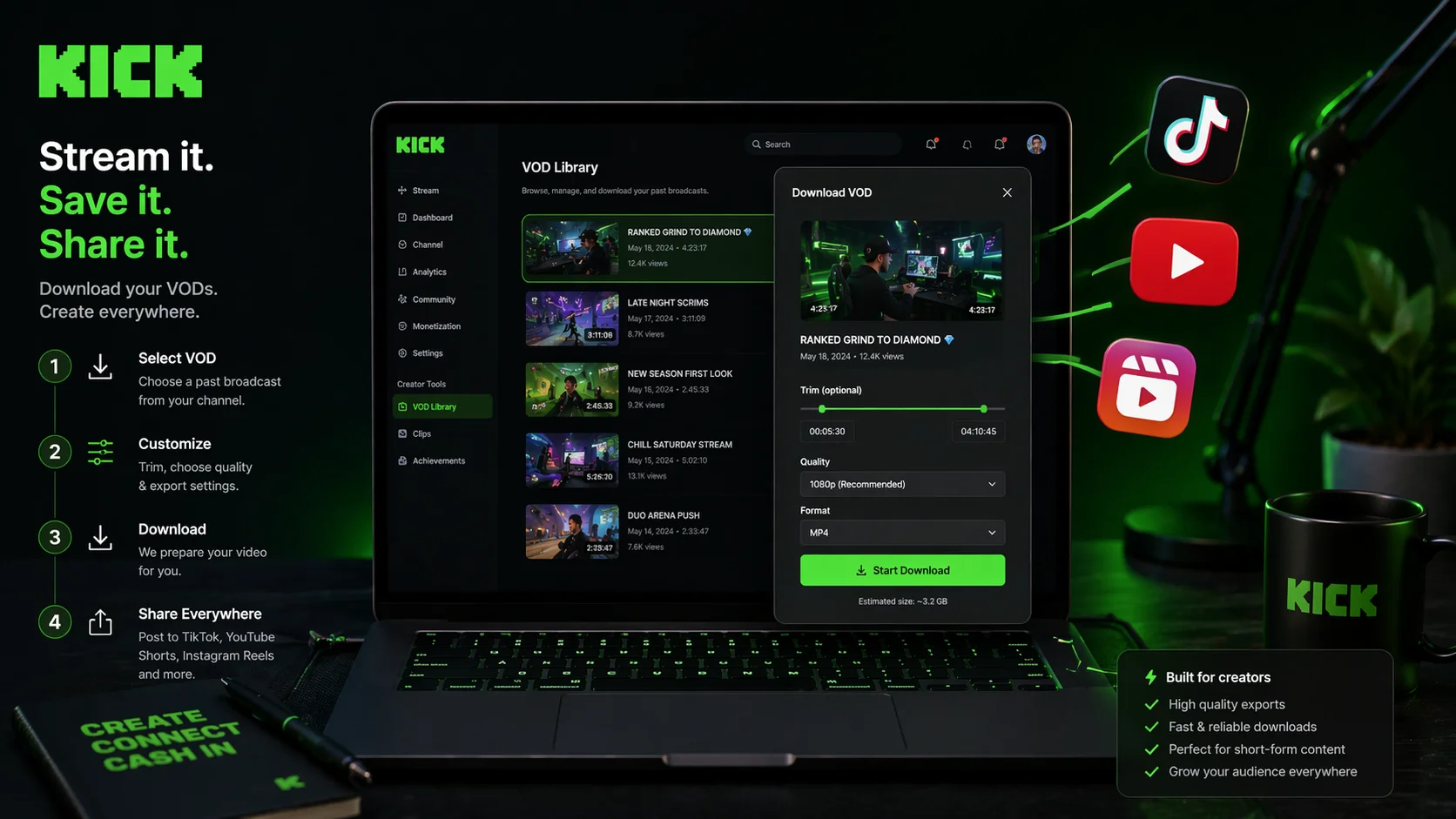
Kick has rapidly emerged as a creator‑first platform, offering streamers better revenue splits and more freedom. But with great freedom comes great responsibility—especially when it comes to how you download, share, and repurpose your own content.
Many streamers assume that because they created the content, they can do anything they want with it. That's mostly true, but there are legal nuances. Downloading a VOD of your own stream is very different from downloading someone else's. And repurposing clips across YouTube Shorts, TikTok, or Instagram Reels requires attention to copyright, music licensing, and platform policies.
This guide will walk you through the legal landscape of downloading and repurposing Kick streams. You'll learn what you own, what you don't, how to download your VODs safely, and how to turn your live content into a cross‑platform growth engine—without risking strikes or bans.
Who Owns Your Kick Content?
Before you download or repurpose anything, you need to understand the legal baseline.
You Own Your Original Content
Kick's terms of service make this clear: streamers retain ownership of their original content. Every frame you create—your gameplay, your face, your reactions—is your intellectual property. Kick does not claim ownership over your streams.
However, there's a critical nuance. You grant Kick a non‑exclusive, limited, revocable license to use your content to operate the platform. That license allows Kick to host, stream, and promote your VODs. But it doesn't transfer ownership, and it doesn't prevent you from using your content elsewhere.
What You Don't Own
Even though you own your stream, you may not own everything within it:
- Copyrighted music: If you played a popular song in the background, you don't own that audio. Using it in a repurposed clip could trigger a copyright claim.
- Third‑party games or assets: While gameplay footage is generally protected as transformative, some game publishers have specific rules about commercial use.
- Other streamers' content: If you co‑stream or host another creator, their contribution remains theirs.
The golden rule: If you didn't create it, assume you need permission.
How Do You Legally Download Your Own Kick VODs?
Downloading your own VODs is not only legal—it's essential for content repurposing. Kick provides official methods and third‑party tools are widely available, but you must use them responsibly.
Official Kick Help Center Method
Kick's official help documentation explains a straightforward process:
- Access the VOD you want to download from your Kick dashboard.
- Copy the link of the VOD from your browser's address bar.
- Paste the link into a supported download site.
- Choose your desired resolution and click download.
Kick also provides guidance on locating the stream replay file, which can then be used with a supported download tool.
Browser Extensions
Several Chrome extensions allow one‑click downloads directly from your Kick video page:
- Kick.com & Twitch.tv VOD Downloader: Adds a download button below Kick videos.
- Kick VOD Downloader: Allows you to pause, rewind, and download live streams and VODs.
- KickSaver: Integrates directly into the Kick video page with instant download buttons.
These extensions automatically detect the video on the screen, fetch available resolutions, and provide download options with a single click.
Command‑Line Tools (For Power Users)
For streamers who want more control, kick-dl is a Python‑based CLI tool that can fetch and download VODs and clips from Kick channels. It supports selecting specific VODs, listing available streams, and customizing download quality.
Online Downloaders
Websites like Wondershare's video converter allow you to paste a Kick VOD URL and download it directly without installing any software.
Critical Warning: Downloading Other Streamers' Content
Downloading a VOD from another Kick streamer without their permission is a violation of Kick's Terms of Service and could constitute copyright infringement. As one guide notes, "Kick VODs belong entirely to the streamer—every frame is their intellectual property. Downloading content without permission can violate their ownership rights as well as Kick's Terms of Service".
Always ask for permission first. Many streamers are happy to collaborate, but assuming you can use their content freely is a legal risk.
How Do You Legally Repurpose Kick Content for Other Platforms?
Once you've downloaded your own VOD, the real opportunity begins: repurposing that content into short‑form clips for YouTube Shorts, TikTok, and Instagram Reels. Done legally, this can multiply your reach. Done carelessly, it can lead to copyright strikes.
What You Can Legally Do With Your Own Content
Because you own your original stream footage, you can:
- Clip and edit any portion of your stream.
- Upload those clips to any platform (YouTube Shorts, TikTok, Instagram, X).
- Monetize those clips through ad revenue, creator funds, or sponsorships.
YouTube's policies explicitly state that videos do not need to be exclusive to YouTube Shorts to be eligible for the creator fund, as long as they are your own original work. The platform restricts "reused content"—but that refers to unedited clips from TV shows and movies, not your own streams.
The Music Problem: Your Biggest Legal Risk
The most common way streamers get into legal trouble is through background music. Even if you played a song during your live stream, that doesn't give you the right to use it in a downloaded clip.
Safe options:
- Use royalty‑free music from sources like Epidemic Sound, Artlist, or StreamBeats.
- Use only the original audio from your stream (your voice, game sounds, etc.).
- Obtain explicit permission from the rights holder.
What to avoid:
- Assuming "fair use" protects you just because you're not monetizing.
- Thinking that giving credit to the artist makes it legal (it doesn't).
- Believing that because the song was playing in the background, it's incidental.
As Kick's copyright guidelines explain, non‑commercial use is just one factor in fair use determination, not a guarantee of protection. And attribution doesn't override copyright protection.
The Four Factors of Fair Use
If you want to use someone else's copyrighted material (including music, clips from other streamers, or game cutscenes), you should understand the four fair use factors:
- Purpose and character of use: Transformative, educational, or commentary uses are more likely to be fair.
- Nature of the copyrighted work: Factual works are easier to claim fair use on than highly creative works.
- Amount used: Using a small portion is better than using a substantial portion.
- Effect on potential market: Your use shouldn't harm the original work's ability to earn revenue.
Examples that might qualify as fair use include: creating commentary or criticism videos about a stream, using short clips for news reporting, educational content analyzing streaming techniques, or parody that significantly transforms the original.
How Does ClipFarmer Help You Download and Repurpose Content?
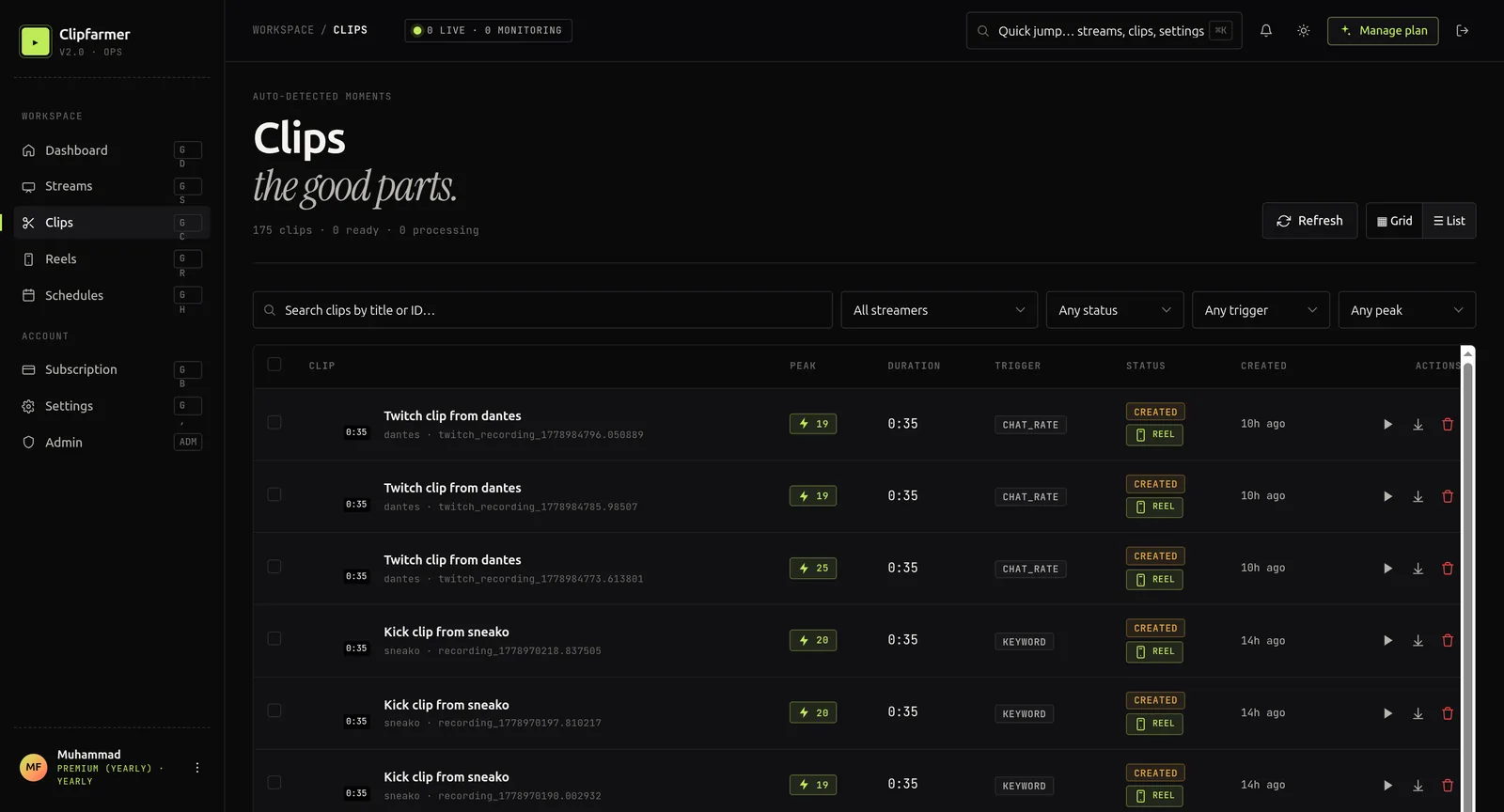
Manual clipping from VODs is time‑consuming. ClipFarmer automates the process while keeping you fully compliant with copyright laws.
Why ClipFarmer Is the Legal Choice
Unlike generic video downloaders that might ignore copyright boundaries, ClipFarmer is designed for streamers who own their content. Here's how it keeps you legal:
- You upload your own VODs or connect your Kick channel—ClipFarmer never scrapes content without permission.
- AI detection identifies your best moments based on speech, emotion, and visual changes.
- Export clips without unlicensed music—you control which audio tracks are included.
- Add your own branding and captions to create transformative, original content.
Step‑by‑Step Workflow With ClipFarmer
- Download your Kick VOD using one of the legal methods described above.
- Upload the VOD to ClipFarmer or connect your Kick channel for direct import.
- Let ClipFarmer's AI analyze the footage and suggest clip‑worthy moments.
- Review and customize each clip—add captions, emojis, progress bars, and your Kick handle.
- Export in vertical format (9:16) optimized for YouTube Shorts, TikTok, and Reels.
- Publish across platforms with keyword‑rich titles and descriptions.
This workflow turns hours of manual editing into minutes of automated processing, all while keeping your content legally sound.
What Are the Platform‑Specific Legal Rules for Repurposed Content?
Each platform has its own rules for repurposed content. Here's what you need to know.
YouTube Shorts
YouTube's Reused Content Policy is strict: content that is not clearly your own original creation may be demonetized or removed. However, clips from your own Kick streams are considered original because you created the underlying content.
To stay compliant:
- Add value through editing, captions, and context.
- Don't just re‑upload the same clip repeatedly.
- Ensure any music is properly licensed.
TikTok
TikTok's copyright enforcement is automated through its Content ID system. If you use unlicensed music, your video may be muted or removed. Stick to TikTok's commercial music library or royalty‑free tracks.
Instagram Reels
Meta's Rights Manager scans for copyrighted material. Repurposing your own Kick clips is fine, but using third‑party music or video without permission can result in content removal or account restrictions.
What Are the Most Common Legal Mistakes and How Do You Avoid Them?
"I'm Not Monetizing, So It's Fine"
Why it's wrong: Non‑commercial use is only one factor in fair use. You can still be sued for copyright infringement even if you make no money.
How to avoid it: Always secure proper licenses or use only content you own.
"I Gave Credit, So It's Legal"
Why it's wrong: Attribution doesn't override copyright protection. Giving credit is polite, but it doesn't grant legal permission.
How to avoid it: Get explicit permission or use royalty‑free alternatives.
"Other Streamers Download My Content, So I Can Download Theirs"
Why it's wrong: Others' potential violations don't justify your own. Kick's terms apply to every user individually.
How to avoid it: Ask for permission. Most streamers will say yes if you reach out professionally.
"It's on the Internet, So It's Free"
Why it's wrong: Most online content is automatically protected by copyright the moment it's created.
How to avoid it: Treat every piece of content as someone's property unless proven otherwise.
What Are the Consequences of Copyright Infringement?
Violating copyright laws can have serious consequences:
- Content removal: Platforms will remove infringing material when reported.
- Account strikes: Repeated violations can lead to account restrictions or termination.
- Legal action: Copyright holders may pursue legal remedies, including financial damages.
Kick follows the DMCA process for copyright claims. If a rights holder submits a valid DMCA notice, Kick will remove the challenged content and may disable access or terminate the account of the reported user.
Legally Downloading and Repurposing Kick Streams FAQs
Can I download my own Kick VODs?
Yes. You own your original content, and Kick provides official methods to download your own VODs. Always use legal download methods and respect other creators' rights.
Is it legal to repurpose my Kick clips for YouTube Shorts?
Yes, because you own the original footage. YouTube's Reused Content Policy applies to content you didn't create, not your own streams. Add editing and captions to add value.
Can I use music from my Kick stream in repurposed clips?
Only if you have the rights to that music. Background songs playing during your stream are typically copyrighted. Use royalty‑free music or remove the audio track before repurposing.
Do I need permission to clip another Kick streamer's content?
Yes. Kick VODs belong entirely to the streamer. Downloading or repurposing their content without permission violates Kick's Terms of Service and may constitute copyright infringement.
What happens if I get a DMCA strike on Kick?
Kick follows the DMCA process. If a valid notice is submitted, the challenged content will be removed. Repeated violations can lead to account restrictions or termination. Strikes may expire after a period of no further violations.
How does ClipFarmer help me stay legally compliant?
ClipFarmer works with your own uploaded VODs, never scrapes content without permission, and gives you full control over audio tracks and edits. You own everything you produce.
Grow Legally, Grow Smart
Downloading and repurposing your Kick streams is not just legal—it's the smartest way to grow your audience. By understanding what you own, respecting what you don't, and using tools like ClipFarmer to automate the process, you can turn every live stream into a cross‑platform content engine.
The key principles are simple:
- Own your content — you created it, you control it.
- Respect others' rights — ask permission, give credit, and avoid unlicensed material.
- Use the right tools — ClipFarmer makes legal repurposing fast and scalable.
Stop leaving your best moments trapped in VODs. Start downloading, repurposing, and growing—the right way.