How to Clip Twitch Streams Automatically in 2026
If you are a content creator, clip channel owner, or stream clipper, you already know how painful it is to sit through hours of VOD footage just to find the best moments. A typical Twitch broadcast runs four to eight hours. Manually scrubbing through that footage means losing an entire workday every time a streamer goes live. What if your clips could create themselves while you focus on editing, posting, and growing your audience?
Automated Twitch stream clipping uses AI to detect the most exciting moments in a broadcast as they happen. Instead of watching every second of a stream, the AI identifies when something clip-worthy occurs and captures it automatically. In this guide, we will walk through why automated clipping matters, how to get started, and how to get the best results from day one.
Why Should You Automate Twitch Clipping?
Manual clipping has been the standard for years. You watch a stream, hit the clip button when something exciting happens, and hope you caught it at the right moment. This approach has three major problems that make it unsustainable for serious content creators.
First, it does not scale. If you are monitoring one streamer, manual clipping is manageable. But clip channel operators often track five, ten, or even twenty streamers across different time zones. You physically cannot watch all of them simultaneously. Second, manual clipping is reactive. By the time you realize something clip-worthy happened, the perfect window may have already passed. Third, it is exhausting. Watching streams for eight hours straight while staying alert enough to clip accurately leads to burnout fast.
Automated clipping solves all three problems. It monitors multiple streams simultaneously, reacts faster than any human can, and runs around the clock without getting tired. Modern AI-powered tools do not clip randomly either. They analyze viewer behavior patterns to identify genuinely exciting moments, so the clips you get are actually worth posting.
How Does AI Know When Something Exciting Happens?
Think about what happens in chat when something incredible occurs on stream. A clutch play, a surprise donation, a game-winning moment. Chat explodes. Viewers spam emotes, type reactions, and flood messages. That sudden surge of activity is the signal.
ClipFarmer's AI monitors chat activity in real time and tracks how fast messages are coming in. Every channel has a normal baseline. When activity suddenly spikes way above that baseline, the AI knows something significant just happened and automatically captures a clip. The clip includes the moments leading up to and during the spike, so you get the full context of whatever made the audience go wild.
This approach works remarkably well because viewer reactions are a reliable signal for exciting content. People react emotionally and immediately to big moments. They do not wait. That instant collective reaction is exactly what the AI picks up on.
What Quality Can You Expect from Automated Clips?
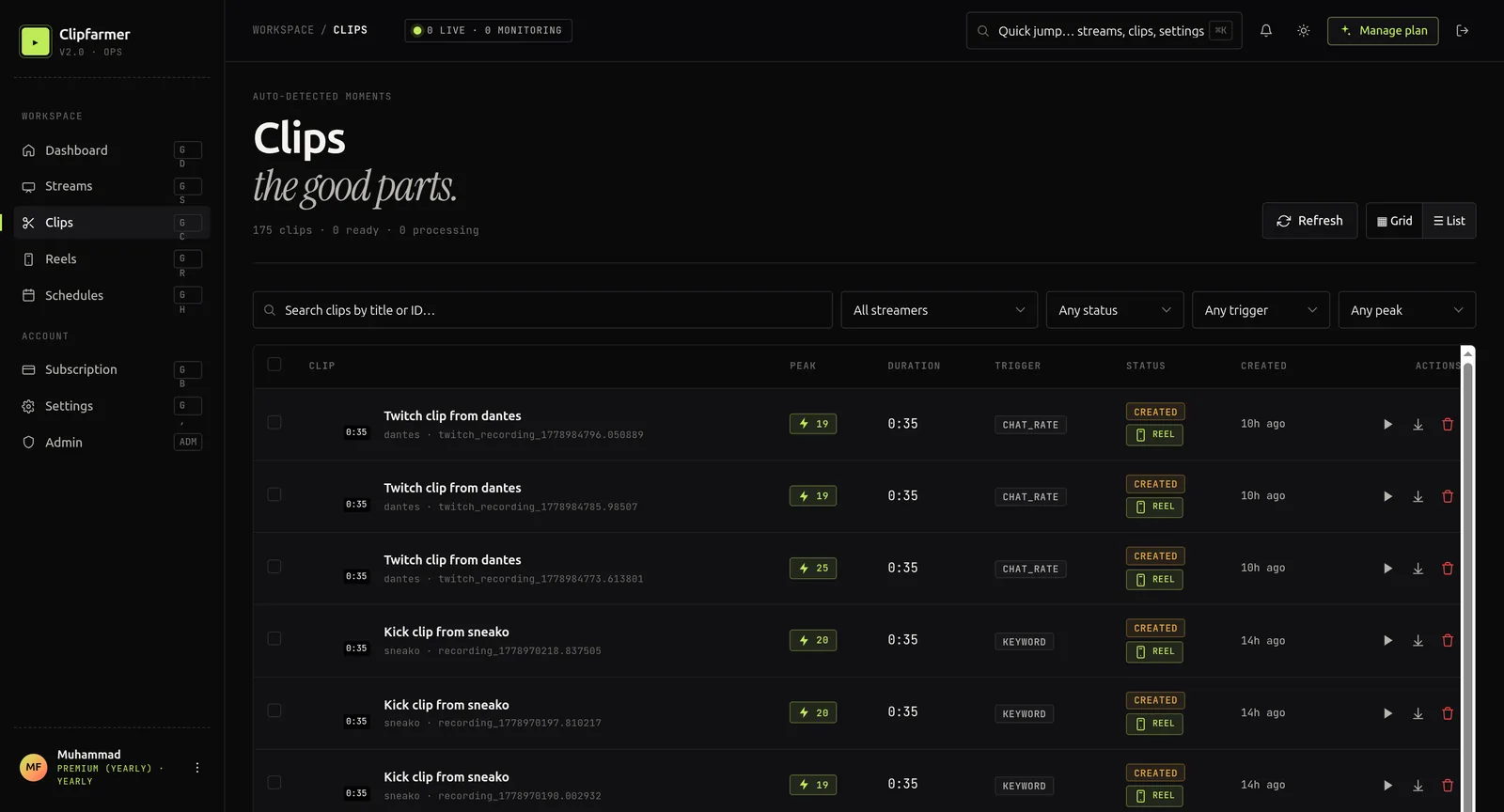
Automated clips from ClipFarmer are captured at up to 1080p at 60 frames per second, depending on the broadcaster's stream quality. Every clip is saved as an MP4 file, which means it works everywhere: browsers, social media platforms, video editors, phones. No format conversion needed.
Each clip also gets an automatically generated thumbnail, making it easy to browse your clips visually and pick the ones you want to use. Both the clip and thumbnail are stored in the cloud and available for download whenever you need them.
ClipFarmer also handles situations where a broadcaster has clips disabled on their channel. The system has multiple recording methods and automatically uses the best available option for each channel, so you never miss a moment regardless of the broadcaster's settings.
How Do You Get Started in 5 Minutes?
Setting up automated Twitch clipping takes less than five minutes. Here is the exact process from account creation to your first automated clip.
- Sign up for a ClipFarmer account and pick the $9/mo Starter tier. It gives you 4 monitored streams and 50 clips per month, which is enough to test the system thoroughly.
- Navigate to the Streams page in your dashboard and add the Twitch channel you want to monitor. Just enter the channel name.
- Configure your sensitivity. The default settings work well for most channels, but you can adjust how sensitive the detection is based on chat size.
- Start monitoring. ClipFarmer begins watching the channel's activity in real time.
- Wait for hype. When the AI detects an exciting moment, a clip is automatically created and stored in your cloud dashboard ready for download.
That is it. Once monitoring is active, clips appear in your dashboard as they are created. You can preview them directly in your browser, download them for editing, or delete ones that do not meet your quality standards.
How Do You Fine-Tune Detection for Better Clips?
The quality of your automated clips depends on how well your sensitivity settings match the channel you are monitoring. Every stream is different. A channel with 200 viewers has very different activity patterns than one with 20,000 viewers. Setting sensitivity too low means you get flooded with clips of every minor moment. Setting it too high means you miss genuinely exciting highlights.
Start with the defaults and review the results after a few streams. If you are getting too many clips, reduce sensitivity. If you are missing obvious big moments, increase it. A good target is roughly 5 to 15 clips per hour of stream time. That gives you enough material to pick the best moments without drowning in content.
For channels with massive, highly active audiences like popular variety streamers or esports tournaments, you will want lower sensitivity since chat is always active. For smaller, more focused communities, higher sensitivity captures the more subtle moments that matter. The key is iteration. Adjust, review your clips, adjust again until you are consistently getting the best highlights.
Can You Schedule Monitoring Automatically?
Most streamers follow a consistent schedule. They go live at the same time on the same days every week. ClipFarmer's smart scheduling lets you set up monitoring windows that start and stop automatically, so you never have to remember to turn monitoring on or off.
You can configure one-time schedules for special events like tournaments, daily recurring schedules for streamers who broadcast every day, or weekly schedules for streamers with specific streaming days. This is especially useful if you are monitoring multiple channels across different time zones. Set it once and forget it. Clips appear in your dashboard as they are created.
What Happens After Clips Are Created?
Once a clip is captured, it is processed and stored in the cloud. Each clip gets a thumbnail generated automatically. Both the clip and thumbnail remain available for the retention period defined by your plan. Starter accounts get 30-day retention, Pro gets 90 days, and Premium gets unlimited retention.
From your dashboard, you can preview clips directly in the browser with our built-in video player, download them for editing in your favorite video editor, or delete clips that did not capture anything interesting. Everything is organized by stream, making it easy to browse through a specific broadcast and pull the highlights you want.
How Much Time Does Automated Clipping Actually Save?
Consider a clip channel operator who monitors 5 streamers, each broadcasting 6 hours per day. Manual monitoring would require 30 hours of watching per day, which is physically impossible for one person. Automated clipping handles all 5 streams simultaneously and produces clips within seconds of each exciting moment.
The quality of automated clips is also surprisingly good. Because the AI detects genuine viewer excitement rather than clipping at random, the clips you get tend to be the actual highlights of the stream. You still need human judgment to pick the best ones for posting, but the system handles the tedious work of watching and capturing. Your role shifts from clip creator to clip curator, which is a much better use of your time and creative energy.
Ready to Start Automating Your Clips?
Automated Twitch clipping is no longer a luxury reserved for large production teams. With ClipFarmer, any content creator can set up AI-powered clip detection in minutes and start building a library of stream highlights automatically. The $9/mo Starter tier includes 4 monitored streams and 50 clips per month, which is more than enough to test the system with your favorite streamers and see the quality for yourself.
The creators who grow fastest in 2026 are the ones who repurpose their stream content effectively. A single six-hour broadcast can produce dozens of clips that fuel your TikTok, YouTube Shorts, Instagram Reels, and Twitter content for an entire week. But you cannot repurpose what you do not capture. Automated clipping ensures every great moment is saved, so you always have a library of raw material ready for editing and posting.
Start with the Starter tier, fine-tune your sensitivity settings based on the results you see, and scale up to Pro or Premium when you are ready to monitor more channels and open up longer retention. The sooner you start, the sooner you stop losing clip-worthy moments to the void of unwatched VODs.
New to the space? Start with our explainer on what clipping is and how it works.